Sunday, September 8, 2024

Integrating vision into RAG applications

 Retrieval Augmented Generation (RAG) is a popular technique to get LLMs to provide answers that are grounded in a data source. What do you do when your knowledge base includes images, like graphs or photos? By adding multimodal models into your RAG flow, you can get answers based off image sources, too!  

Our most popular RAG solution accelerator, azure-search-openai-demo, now has support for RAG on image sources. In the example question below, the LLM answers the question by correctly interpreting a bar graph:  

This blog post will walk through the changes we made to enable multimodal RAG, both so that developers using the solution accelerator can understand how it works, and so that developers using other RAG solutions can bring in multimodal support. 

First let's talk about two essential ingredients: multimodal LLMs and multimodal embedding models. 


Multimodal LLMs 

Azure now offers multiple multimodal LLMs: gpt-4o and gpt-4o-mini, through the Azure OpenAI service, and phi3-vision, through the Azure AI Model Catalog. These models allow you to send in both images and text, and return text responses. (In the future, we may have LLMs that take audio input and return non-text inputs!) 

For example, an API call to the gpt-4o model can contain a question along with an image URL: 

{ 
"role": "user", 
"content": [ 
{ 
"type": "text", 
"text": "What’s in this image?" 
}, 
{ 
      "type": "image_url", 
      "image_url": { 
       "url": "https://upload.wikimedia.org/wikipedia/commons/thumb/d/dd/Gfp-wisconsin-madison-the-nature-boardwalk.jpg/2560px-Gfp-wisconsin-madison-the-nature-boardwalk.jpg" 
       } 
     } 
] 
} 

Those image URLs can be specified as full HTTP URLs, if the image happens to be available on the public web, or they can be specified as base-64 encoded Data URIs, which is particularly helpful for privately stored images. 

For more examples working with gpt-4o, check out openai-chat-vision-quickstart, a repo which can deploy a simple Chat+Vision app to Azure, plus includes Jupyter notebooks showcasing scenarios. 


Multimodal embedding models 

Azure also offers a multimodal embedding API, as part of the Azure AI Vision APIs, that can compute embeddings in a multimodal space for both text and images. The API uses the state-of-the-art Florence model from Microsoft Research. 

For example, this API call returns the embedding vector for an image: 

curl.exe -v -X POST "https://<endpoint>/computervision/retrieval:vectorizeImage?api-version=2024-02-01-preview&model-version=2023-04-15" --data-ascii " { 'url':'https://learn.microsoft.com/azure/ai-services/computer-vision/media/quickstarts/presentation.png' }" 

Once we have the ability to embed both images and text in the same embedding space, we can use vector search to find images that are similar to a user's query. Check out this notebook that setups a basic multimodal search of images using Azure AI Search. 
 

Multimodal RAG 

With those two multimodal models, we were able to give our RAG solution the ability to include image sources in both the retrieval and answering process. 

At a high-level, we made the following changes: 

  • Search index: We added a new field to the Azure AI Search index to store the embedding returned by the multimodal Azure AI Vision API (while keeping the existing field that stores the OpenAI text embeddings). 
  • Data ingestion: In addition to our usual PDF ingestion flow, we also convert each PDF document page to an image, store that image with the filename rendered on top, and add the embedding to the index. 
  • Question answering: We search the index using both the text and multimodal embeddings. We send both the text and the image to gpt-4o, and ask it to answer the question based on both kinds of sources. 
  • Citations: The frontend displays both image sources and text sources, to help users understand how the answer was generated. 

Let's dive deeper into each of the changes above. 


Search index 

For our standard RAG on documents approach, we use an Azure AI search index that stores the following fields: 

  • content: The extracted text content from Azure Document Intelligence, which can process a wide range of files and can even OCR images inside files. 
  • sourcefile: The filename of the document 
  • sourcepage: The filename with page number, for more precise citations. 
  • embedding:  A vector field with 1536 dimensions, to store the embedding of the content field, computed using text-only OpenAI ada-002 model.

For RAG on images, we add an additional field: 

  • imageEmbedding: A vector field with 1024 dimensions, to store the embedding of the image version of the document page, computed using the AI Vision vectorizeImage API endpoint. 


Data ingestion 

For our standard RAG approach, data ingestion involves these steps: 

  1. Use Azure Document Intelligence to extract text out of a document 
  2. Use a splitting strategy to chunk the text into sections. This is necessary in order to keep chunk sizes at a reasonable size, as sending too much content to an LLM at once tends to reduce answer quality. 
  3. Upload the original file to Azure Blob storage. 
  4. Compute ada-002 embeddings for the content field. 
  5. Add each chunk to the Azure AI search index. 

For RAG on images,  we add two additional steps before indexing: uploading an image version of each document page to Blob Storage and computing multi-modal embeddings for each image. 


Generating citable images 

The images are not just a direct copy of the document page. Instead, they contain the original document filename written in the top left corner of the image, like so: 


This crucial step will enable the GPT vision model to later provide citations in its answers. From a technical perspective, we achieved this by first using the PyMuPDF Python package to convert documents to images, then using the Pillow Python package to add a top border to the image and write the filename there.


Question answering 

Now that our Blob storage container has citable images and our AI search index has multi-modal embeddings, users can start to ask questions about images. 

Our RAG app has two primary question asking flows, one for "single-turn" questions, and the other for "multi-turn" questions which incorporates as much conversation history that can fit in the context window. To simplify this explanation, we'll focus on the single-turn flow.  

Our single-turn RAG on documents flow looks like: 


1. Receive a user question from the frontend. 

2. Compute an embedding for the user question using the OpenAI ada-002 model. 

3. Use the user question to fetch matching documents from the Azure AI search index, using a hybrid search that does a keyword search on the text and a vector search on the question embedding. 

4. Pass the resulting document chunks and the original user question to the gpt-3.5 model, with a system prompt that instructs it to adhere to the sources and provide citations with a certain format. 

Our single-turn RAG on documents-plus-images flows looks like this: 


1. Receive a user question from the frontend. 

2. Compute an embedding for the user question using the OpenAI ada-002 model AND an additional embedding using the AIVision API multimodal model. 

3. Use the user question to fetch matching documents from the Azure AI search index, using a hybrid multivector search that also searches on the imageEmbedding field using the additional embedding. This way, the underlying vector search algorithm will find results that are both similar semantically to the text of the document but also similar semantically to any images in the document (e.g. "what trends are increasing?" could match a chart with a line going up and to the right). 

4. For each document chunk returned in the search results, convert the Blob image URL into a base64 data-encoded URI. Pass both the text content and the image URIs to GPT-4-vision, with this prompt that describes how to find and format citations: 

The documents contain text, graphs, tables and images. 

Each image source has the file name in the top left corner of the image with coordinates (10,10) pixels and is in the format SourceFileName:<file_name> 

Each text source starts in a new line and has the file name followed by colon and the actual information. Always include the source name from the image or text for each fact you use in the response in the format: [filename]  

Answer the following question using only the data provided in the sources below. 

The text and image source can be the same file name, don't use the image title when citing the image source, only use the file name as mentioned. 

Now, users can ask questions where the answers are entirely contained in the images and get correct answers! This can be a great fit for diagram-heavy domains, like finance. 


Considerations 

We have seen some really exciting uses of this multimodal RAG approach, but there is much to explore to improve the experience. 

More file types: Our repository only implements image generation for PDFs, but developers are now ingesting many more formats, both image files like PNG and JPEG as well as non-image files like HTML, docx, etc. We'd love help from the community in bringing support for multimodal RAG to more file formats. 

More selective embeddings: Our ingestion flow uploads images for *every* PDF page, but many pages may be lacking in visual content, and that can negatively affect vector search results. For example, if your PDF contains completely blank pages, and the index stored the embeddings for those, we have found that vector searches often retrieve those blank pages. Perhaps in the multimodal space, "blankness" is considered similar to everything. We've considered approaches like using a vision model in the ingestion phase to decide whether an image is meaningful, or using that model to write a very descriptive caption for images instead of storing the image embeddings themselves. 

Image extraction: Another approach would be to extract images from document pages, and store each image separately. That would be helpful for documents where the pages contain multiple distinct images with different purposes, since then the LLM would be able to focus more on only the most relevant image. 

We would love your help in experimenting with RAG on images, sharing how it works for your domain, and suggesting what we can improve. Head over to our repo and follow the steps for deploying with the optional GPT vision feature enabled, and let us know how it goes! 
 

Friday, August 9, 2024

Making an Ollama-compatible RAG app

Ollama is a tool that makes it easy to run small language models (SLMs) locally on your own machine - Mac, Windows, or Linux - regardless of whether you have a powerful GPU. It builds on top of llama.cpp, which uses various techniques to be able to run language models on a CPU, whether it's ARM or AMD.

I am excited about Ollama because it empowers anyone to start experimenting with language models, and because it gives me an easy way to see how the SLMs compare to the LLMs that I typically use (GPT 3.5, GPT 4).

As you know if you've read my blog, I spend much of my time these days on building applications using RAG (Retrieval Augmented Generation), a technique that gets an LLM to answer questions accurately for a domain.

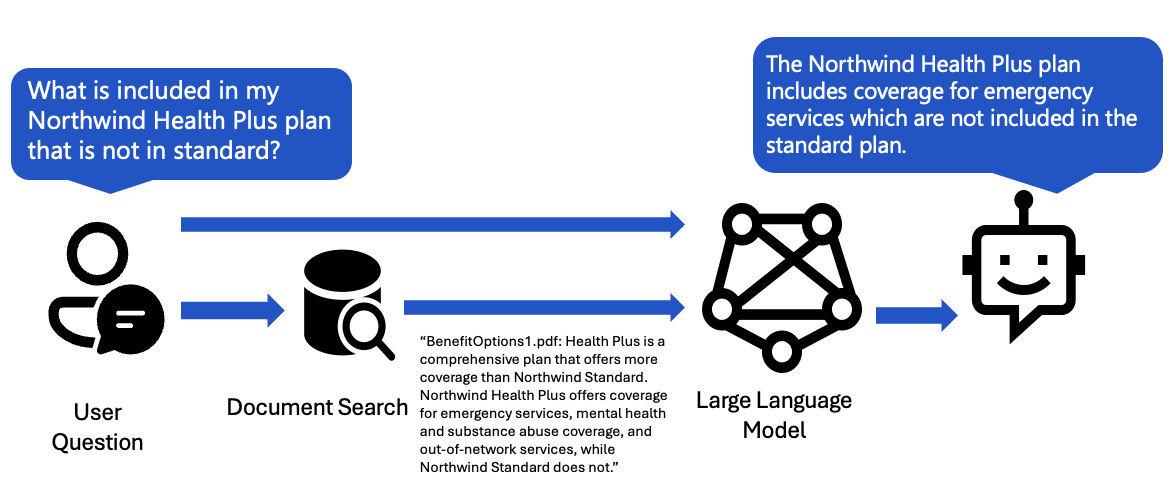
A simple RAG flow can be visualized by this diagram:

Diagram of RAG flow, user question to data source to LLM

We take the user question, use it to search the database, then send the results to the LLM to answer.

I've been on a quest to figure out how to make my RAG applications compatible with Ollama SLMs, and I've finally got the components working well enough together in our RAG on PostgreSQL solution.


Challenge #1: Citation format

In our system message, we demand that the LLM stick to the sources, and that it provides citations in a particular format:

Each product has an ID in brackets followed by colon and the product details. Always include the product ID for each product you use in the response. Use square brackets to reference the source, for example [52]. Don't combine citations, list each product separately, for example [27][51].

The citation format is important, so that the frontend can renders the citations as footnotes.

When I first started testing out SLMs, I was immediately disheartened by the results, as they wouldn't adhere to my instructions. For example, given that system message, the llama2:7b model generated answers like:

The Trekker Clear Hiking Shoes from WildRunner are designed for the adventurous hiker who seeks both comfort and durability. The transparent shoes feature a waterproof and breathable upper fabric, a rugged carbon-infused sole for excellent traction, and a shock-absorbing midsole for enhanced comfort on long hikes.

Notice: no citations! Not even an attempt at brackets. Fortunately, llama 3.1L8B came out last week, and it reliably generates citations in the correct format:

The Trekker Clear Hiking Shoes from WildRunner are designed for comfort and durability [41]. They have a transparent upper fabric, which is waterproof and breathable, allowing for airflow while keeping feet dry on long hikes. The shoe also features a rugged carbon-infused sole for excellent traction and a shock-absorbing midsole for enhanced comfort.

See that citation in brackets at the end of the first sentence? Now our frontend can reliably connect the citations to the data sources, and render more source details to the user.

Screenshot of answer in UI

Challenge #2: Vector embeddings

When we search the database using the user query, the best practice is to use a hybrid search, a combination of vector search plus full-text search. For a PostgreSQL database, we can achieve a hybrid search using the built-in full text search feature plus the pgvector extension.

In order to do that vector search, we first need to use an embedding model to compute the vector embeddings for each row of the database. In production, I use an OpenAI embedding model. With Ollama, there are several embedding models available, plus an OpenAI-compatible embeddings endpoint.

To make it easy for me to switch between OpenAI and Ollama, I made separate columns for each model in my schema:

embedding_ada002: Mapped[Vector] = mapped_column(Vector(1536))  # ada-002
embedding_nomic: Mapped[Vector] = mapped_column(Vector(768))  # nomic-embed-text

Then I made the embedding column into an environment variable, so that I could set it alongside my selection of models, and all my code updates and queries the right embedding column. Here's the updated vector search SQL query:

vector_query = f"""
   SELECT id, RANK () OVER (ORDER BY {self.embedding_column} <=> :embedding) AS rank
     FROM items
     {filter_clause_where}
     ORDER BY {self.embedding_column} <=> :embedding
     LIMIT 20
 """

Finally, I updated my local seed data with the embedding_nomic column, so that I could start running queries on the local data immediately.


Challenge #3: Function calling

Earlier I showed a diagram of a simple RAG flow. That's great for a start, but for a production-level RAG, we need a more advanced RAG flow, like this one:

diagram of extended RAG flow, user question to LLM to data source to LLM

We take the user question, send it to an LLM in a query rewriting step, use the LLM-suggested query to search the knowledge base, and then send the results to the LLM to answer. This query rewriting step brings multiple benefits:

  • If the user's query references a topic earlier in the conversation (like "and what other options are there?"), the LLM can fill in the missing context (turning it into a search query like "other shoe options").
  • If the user's query has spelling errors or is written in a different language, the LLM can clean up the spelling and translate it.
  • We can use that step to figure out metadata for searching as well. For the RAG on PostgreSQL, we also ask the LLM to suggest filters for the price or brand columns, to better answer questions like "get me shoes cheaper than $30".

For best results, we use the OpenAI function calling feature to give us more structured retrieval. OpenAI also just announced an overlapping feature, Structured Outputs, but that's newer and less widely supported.

Fortunately, Ollama just added support for OpenAI function calling, available for a handful of models, including my new favorite, llama3.1.

But when I first tried my function calls with llama3.1, I got poor results: it worked fine for the most basic function call with a single argument, but completely made up the arguments for any fancier function calls. When I shared my llama3.1 vs. gpt-35-turbo comparison with others, I was told to try providing few shot examples. That same week, Langchain put out a blog post about using few shot examples to improve function calling performance.

So I made several few shot examples, like:

{
  "role": "user",
  "content": "are there any shoes less than $50?"
},
{
  "role": "assistant",
  "tool_calls": [
    {
      "id": "call_abc456",
      "type": "function",
      "function": {
        "arguments": "{\"search_query\":\"shoes\",\"price_filter\":{\"comparison_operator\":\"<\",\"value\":50}}",
        "name": "search_database"
      }
    }
  ]
},
{
  "role": "tool",
  "tool_call_id": "call_abc456",
  "content": "Search results for shoes cheaper than 50: ..."
}

And it worked! Now, when I use Ollama with llama3.1 for the query rewriting flow, it gives back function arguments that match the function schema.


Challenge #4: Token counting

Our frontend allows the users to have long conversations, so that they can keep asking more questions about the same topic. We send the conversation history to the LLM, so it can see previously discussed topics. But what happens if a conversation is too long for the context window of an LLM?

In our solution, our approach is to truncate the conversation history, dropping the older messages that don't fit. In order to that, we need to accurately count the tokens for each message. For OpenAI models, we can use the tiktoken package for token counting, which brings in the necessary token model for the model used. I've built a openai-messages-token-helper package on top of tiktoken that provides convenience functions for token counting and conversation truncation.

Here's the problem: each model has their own tokenization approach, and the SLMs don't use the same tokenizer as the OpenAI embedding models. So, if we use tiktoken to calculate the token counts, our counts may be very off, and we may accidentally send a sequence of messages that exceeds the context window of the SLM. We have two options:

  1. SLM tokenizers: It should be possible to bring in tokenizers for many/all of the SLMs via the HuggingFace tokenizers class. I have not done it myself, but I've seen it implemented in litellm and elsewhere.
  2. Accept the inaccuracy: We can use the OpenAI tokenizer, assuming it's close to correct, and expect to see a few errors around context windows being exceeded.

For now, I am going with approach #2, since my primary use of Ollama is local development and teaching situations. If I was going to use Ollama in a production scenario, I would go for approach #1 and go through the effort of bringing in the SLM's tokenizer. Instead, I log out a warning to the terminal so that the developer is aware that we're not using the correct tokenizer, and that has been fine for development so far.

All together now

All those pieces are implemented in rag-postgres-openai-python, and you can try it out today in GitHub Codespaces, as long as you have a GitHub account and sufficient Codespaces quota. The Ollama feature does require a larger Codespace than usual, since LLMs require more memory, so you may find that it uses up your quota faster than typical Codespace usage. You can also use it locally, with an Ollama running on your machine. Give it a go, and let me know in the issue tracker if you encounter any issues! Also, if you have ported other RAG solutions to Ollama, please share your challenges and solutions. Happy llama'ing!

Wednesday, July 10, 2024

Playwright and Pytest parametrization for responsive E2E tests

I am a big fan of Playwright, a tool for end-to-end testing that was originally built for Node.JS but is also available in Python and other languages.

Playwright 101

For example, here's a simplified test for the chat functionality of our open-source RAG solution:

def test_chat(page: Page, live_server_url: str):

  page.goto(live_server_url)
  expect(page).to_have_title("Azure OpenAI + AI Search")
  expect(page.get_by_role("heading", name="Chat with your data")).to_be_visible()

  page.get_by_placeholder("Type a new question").click()
  page.get_by_placeholder("Type a new question").fill("Whats the dental plan?")
  page.get_by_role("button", name="Submit question").click()

  expect(page.get_by_text("Whats the dental plan?")).to_be_visible()

We then run that test using pytest and the pytest-playwright plugin on headless browsers, typically chromium, though other browsers are supported. We can run the tests locally and in our GitHub actions.

Viewport testing

We recently improved the responsiveness of our RAG solution, with different font sizing and margins in smaller viewports, plus a burger menu:

Screenshot of RAG chat at a small viewport size

Fortunately, Playwright makes it easy to change the viewport of a browser window, via the set_viewport_size function:

page.set_viewport_size({"width": 600, "height": 1024})

I wanted to make sure that all the functionality was still usable at all supported viewport sizes. I didn't want to write a new test for every viewport size, however. So I wrote this parameterized pytest fixture:

@pytest.fixture(params=[(480, 800), (600, 1024), (768, 1024), (992, 1024), (1024, 768)])
def sized_page(page: Page, request):
    size = request.param
    page.set_viewport_size({"width": size[0], "height": size[1]})
    yield page

Then I modified the most important tests to take the sized_page fixture instead:

def test_chat(sized_page: Page, live_server_url: str):
  page = sized_page
  page.goto(live_server_url)

Since our website now has a burger menu at smaller viewport sizes, I also had to add an optional click() on that menu:

if page.get_by_role("button", name="Toggle menu").is_visible():
    page.get_by_role("button", name="Toggle menu").click()

Now we can confidently say that all our functionality works at the supported viewport sizes, and if we have any regressions, we can add additional tests or viewport sizes as needed. So cool!

Should you use Quart or FastAPI for an AI app?

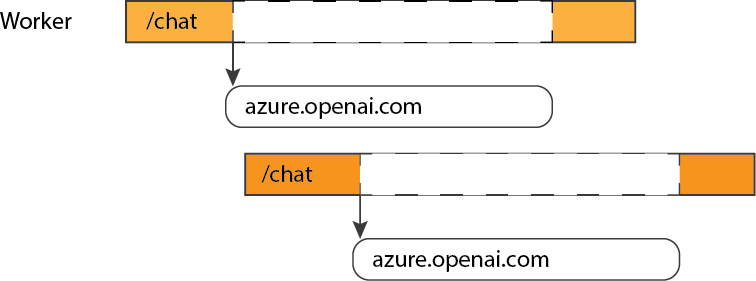
As I have discussed previously, it is very important to use an async framework when developing apps that make calls to generative AI APIs, so that your backend processes can concurrently handle other requests while they wait for the (relatively slow) response from the AI API.

Diagram of worker handling second request while first request waits for API response

Async frameworks

There are a few options for asynchronous web frameworks for Python developers:

  • FastAPI: A framework that was designed to be async-only from the beginning, and an increasingly popular option for Python web developers. It's particularly well suited to APIs, because it includes Swagger (OpenAPI) for auto-generated documentation based off type annotations.
  • Quart: The async version of the popular Flask framework. It is now actually built on Flask, so it brings it in as a dependency and reuses what it can. It tries to mimic the Flask interface as much as possible, with exceptions only when needed for better async support.
  • Django: The default for Django is a WSGI app with synchronous views, but it is now possible to write async views as well and run the Django app as an ASGI app.

Quart vs. FastAPI

So which framework should you choose? Since I have not personally used Django with async views, I'm going to focus on comparing Quart vs. FastAPI, as I have used them for a number of AI-on-Azure samples.

  • If you already have Flask apps, it is much easier to turn them into Quart apps than FastAPI apps, given the purposeful similarity of Quart to Flask. You may run into issues if you are using many Flask extensions, however, since not all of them have been ported to Quart.
  • In my experience, Quart is easier to use if your app includes static files / HTML routes. It is possible to use FastAPI for a full webapp, but it is harder. That said, I've figured it out in a few projects, such as rag-postgres-openai-python so you can look at that approach for inspiration.
  • FastAPI has built-in API documentation. To do that with Quart, you need to use Quart-Schema. That extension is fairly straightforward to use, and I have successfully used it with Quart apps, but it is certainly easier with FastAPI.
  • Quart has a good number of extensions available, largely due to many extensions being forked from Flask extensions. There is less of an extension ecosystem for FastAPI, perhaps because there is not an established extension mechanism. There are many tutorials and discussion posts that show how to implement features in FastAPI, however, thanks to the popularity of FastAPI.
  • The performance between Quart and FastAPI should be fairly similar, though I haven't done tests to directly compare the two. The most standard way to run them is with gunicorn and a uvicorn worker, but it is now possible to run uvicorn directly, as of the latest uvicorn release. Another server is hypercorn, created by the Quart creator, but I haven't used that in production myself.
  • Quart is an open-source project that is part of the Pallets ecosystem, and primarily maintained by @pgjones. FastAPI is also an open-source project, primarily maintained by @tiangolo, who recently received funding to work on monetization strategies. Both of them are regularly maintained at this point.

Both frameworks are solid options, with different benefits. Share any experiences you've had in the comments!